SOURCE → ENRICH → VERIFY → SEQUENCE

I turn manual GTM work into reliable revenue systems.

Most outbound breaks on bad data, not bad copy. I find where the list falls apart (missing emails, dead domains, contacts nobody verified) and build the enrichment and verification layers that stop it, so the sequencer only ever sees records worth sending to. Sourcing runs through AI Ark; Clay handles enrichment and verification.

4Outbound campaigns operated
~11KContacts reached
34Positive responses
SOURCE_TO_SEQUENCE.OPERATOR ROUTING
01 / AI CLAUDE CODE CLAY CRM SEQUENCER
02 / SOURCE AI ARK CLAY CRM SEQUENCER
03 / LIST SIGNALS CLAY CRM SEQUENCER
3 inputs · 1 reliable systemENRICHED → SYNCED → LIVE

Built and operated outbound campaigns end to end.

Hands-on freelance work covering campaign strategy, data operations, Clay enrichment, three-touch email copy, and outbound execution.

Freelance GTM Automation · Gratefully

Built and operated the outbound system for Gratefully, a nonprofit-sector product, from ICP definition and AI Ark data enrichment through Claude Code personalization, Instantly campaign execution, and AI-assisted positive-reply routing into Slack.

May 2026 - Jun 2026
01 / Strategy

Defined the ICP for the nonprofit market and scoped founder, co-founder, and relevant decision-maker profiles for each campaign.

02 / Data + personalization

Sourced company and decision-maker people data in AI Ark, enriched their work emails, and used Claude Code to create persona-specific personalization.

03 / Activation + reply routing

Launched four three-touch campaigns in Instantly, then used an n8n AI agent to identify positive responses and send them from Instantly into Slack for follow-up.

4Campaigns operated
3-touchEmail copy written
~11KContacts reached
~32KEmails sent
~200Human replies
34Positive responses
Meet the operator behind the systems.

A short introduction to who I am, the experience behind my GTM work, and the way I approach building practical outbound systems.

Personal introduction on Loom

Video not loading? Open it directly in Loom ↗

Project-management discipline, applied to GTM systems.

I’m Lyba, a Technical Project Manager turned GTM systems builder. I’ve managed 15+ software projects and led client discovery, which is where I saw exactly how revenue processes break: repetitive research, fragmented data, weak CRM handoffs, and follow-up that runs on memory. I now turn those bottlenecks into mapped, repeatable workflows. My background in electrical engineering and technical delivery shapes how I build: define the inputs, model the logic, test the failure paths, document the handoff.

100Companies targeted in Clay table
6Find + verify waterfall layers
15+Concurrent projects managed

The workflow is only useful if it survives imperfect data.

These are the controls I use to evaluate a GTM system before handoff. They make the difference between a demo that runs once and an operation a team can trust.

01

Validate inputs

Normalize required fields and catch missing or duplicate records before spending enrichment credits.

02

Route failures

Call the next provider only after a miss, reject invalid emails, and preserve an explicit exhausted state.

03

Gate AI output

Generate structured fields, check for missing context, and keep weak personalization out of activation.

04

Control handoff

Map clean fields into the CRM first, then launch only records that meet data and sending requirements.

Production test

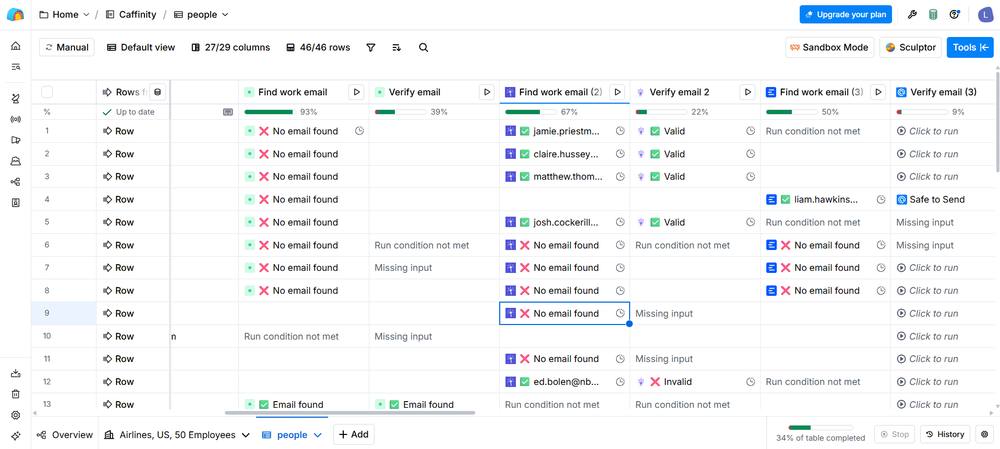
I ask what happens when a provider returns nothing, an API times out, a record already exists, or an AI field is low-confidence. Those paths get designed before scale, not discovered during a live campaign. The find-and-verify waterfall built on these controls ran six layers across 46 contacts and returned a single verified email column.

Build log / source → enrich → verify → personalize Recorded on Loom
← Back to home
CASE STUDIES

Real builds behind the source-to-sequence system.

Five independent builds. Open any one for the results, the build steps and the tools behind it.

← All case studies
CASE STUDY / 01 · SOURCING → COPY → REPLY TRIAGE

Gratefully: nonprofit outbound, list to reply

Four outbound campaigns for a nonprofit donor-analytics product: list building and filtering, three-touch copy written per contact across three angles, and an n8n agent that classifies every reply before a human sees it.

~11KContacts reached
~32KEmails sent
34Positive replies

How I built it

  • Pulled the raw contact list out of AI Ark, every title and company size included.
  • Screened for deliverability first, running email status and SMTP checks, so no copy was written for an address that would bounce.
  • Filtered to nonprofit company type, dropping the vendors and other organisation types the same export had swept in.
  • Narrowed to decision-maker titles only: CEO, Executive Director, Director, Founder, VP. That is where budget authority sits.
  • Collapsed duplicates so each organisation appears once instead of several times, which left a clean list worth emailing.
  • Hand-checked a small sample and rendered the real copy against it before anything went near a sequencer.
  • Wrote three competing angles: lapsed donors, time saved, peer comparison. That way the angle could be tested rather than guessed.
  • Drafted three tone variants of the same email (direct, story, mission) so voice could be tested separately from angle.
  • Generated the subject and body straight into the export as subject_1 and email_1 columns, so the file imports into Instantly or Smartlead without hand-editing.
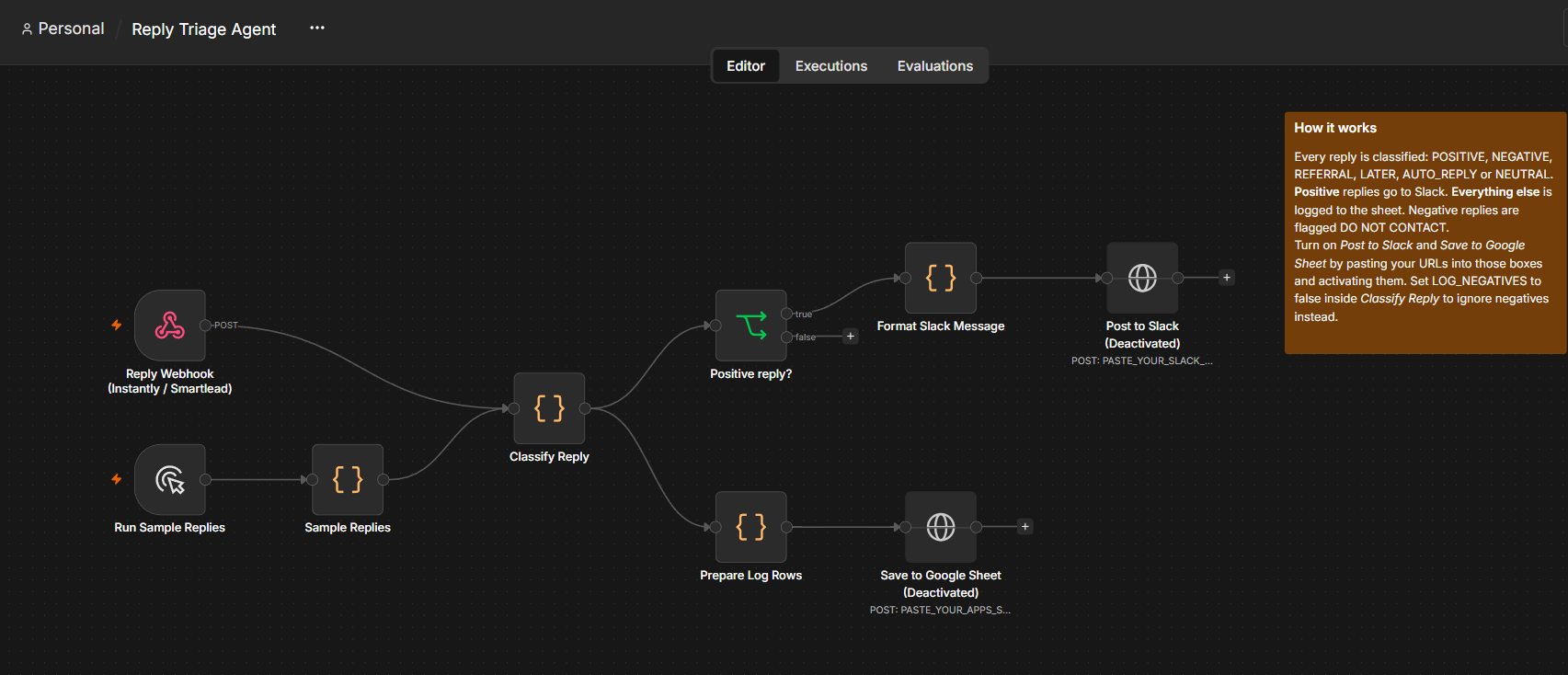
  • Built a reply-triage agent in n8n that classifies every reply as POSITIVE, NEGATIVE, REFERRAL, LATER, AUTO_REPLY or NEUTRAL.
  • Routed positives to Slack for a same-day response; everything else logs to a sheet, and negatives are flagged DO NOT CONTACT so they cannot re-enter a sequence.
  • Ran four three-touch campaigns: about 11K contacts, about 32K emails, about 200 human replies, 34 positive, bounce rate under 0.5%.
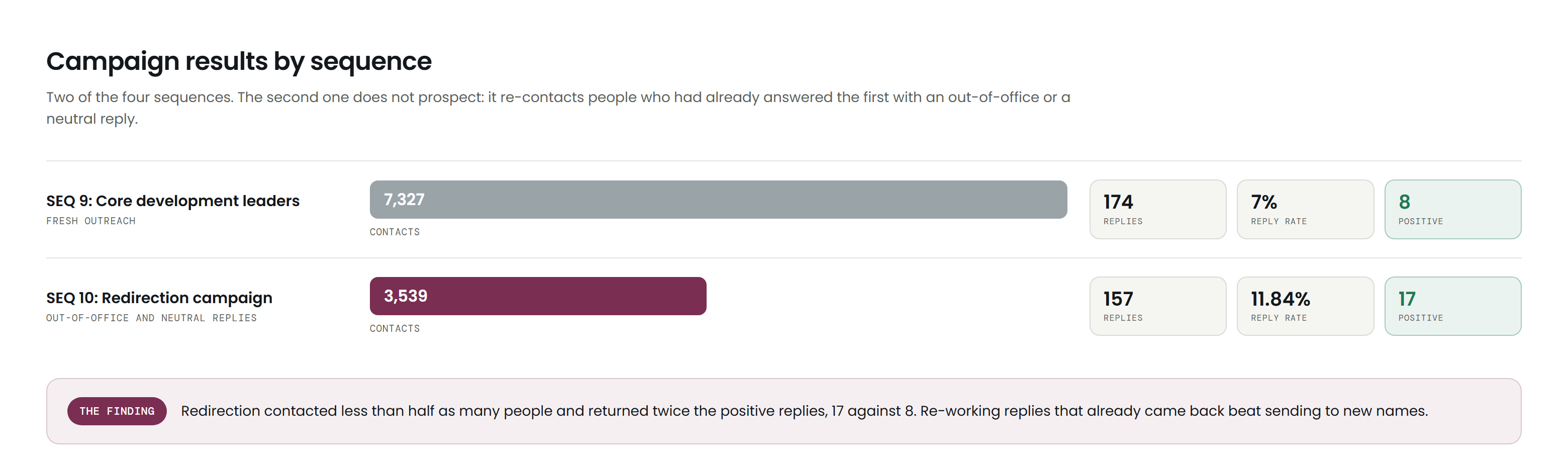
  • 17 of the 34 positive replies came from a redirect campaign that re-contacted people who had already sent an out-of-office or neutral reply; the other 17 came from fresh outreach.
  • Kept every sample recipient shown here fictional, so the build can be published without exposing a single real prospect.

What it produced

Campaign results by sequence: contacts, replies, reply rate and positive replies for two sequences
Two of the four sequences. The redirection sequence re-contacted people who had already replied out of office or neutral, and returned twice the positive replies from less than half the contacts.
n8n Reply Triage Agent: webhook, classify, route to Slack or log to sheet
Every reply classified before a human sees it. Positives go to Slack; the rest is logged, and negatives are flagged DO NOT CONTACT.

The sequence, as it went out

Three steps over three days, shown here as one contact received them. Steps 2 and 3 carry no subject of their own, so they land as replies in the same thread.

STEP 1 · VARIANT 1Day 0
Subject: Brightpath Community Fund <> Gratefully
Hey Maya, you are running after-school programs across three school districts which resonates with me a lot. I am Muddsar founder of Gratefully and I myself spent twenty years in volunteering with nonprofits and creating software across Silicon Valley. I saw a pattern where most development directors end up as the bridge between the CRM and the six other systems around it. That work is not fundraising, and it never stops. To resolve this, Gratefully goes through your whole portfolio overnight and opens with a ranked list of who needs attention and each one with the reason attached. Want me to run Brightpath Community Fund's latest annual report through it and send back what it finds? On the house! Regards, Muddsar
STEP 1 · VARIANT 2Day 0
Subject: Brightpath Community Fund <> Gratefully
Hey Maya, seeing that you are running after-school programs across three school districts resonates with me a lot. I am Muddsar founder of Gratefully and I spent twenty years volunteering with nonprofits as well as creating software across Silicon Valley. I started Gratefully after a nonprofit asked me if they could just paste their donor data into ChatGPT for donor analytics. Right instinct, wrong place to put it. Gratefully runs your whole portfolio overnight and hands back a ranked list of who needs attention, each with the reason cited straight from your own data. Want me to run Brightpath Community Fund's latest report through it and send back what it finds? No strings attached! Regards, Muddsar
STEP 1 · VARIANT 3Day 0
Subject: Brightpath Community Fund <> Gratefully
Hey Maya, you are running after-school programs across three school districts which resonates with me a lot. I am Muddsar founder of Gratefully and I spent twenty years volunteering with nonprofits as well as creating software across Silicon Valley. I started Gratefully so we can secure donors for non-profits like Brightpath Community Fund. Gratefully goes through your whole portfolio overnight and opens with a ranked list of who needs attention, each one with the reason attached and cited to your own data. Want me to run latest annual report of Brightpath Community Fund through it and send back what it finds? On the house! Regards, Muddsar
STEP 2Day 1
Re: Brightpath Community Fund <> Gratefully
Maya, one more thought. Most development directors can't tell which donor relationships are drifting unless someone spends a day pulling the numbers together. By the time the numbers catch it, the relationship has usually already cooled. Happy to still run that report if it's useful. Sincerely, Muddsar
STEP 3Day 2
Re: Brightpath Community Fund <> Gratefully
Maya, This is what the donor report will provide you: - Lapsed major donors worth a second look - Foundation connections - Planned giving signals If donor context is not what is slowing your team down, say so and I will stop. If someone else owns it, point me their way. Sincerely, Muddsar

What changes per contact

Nothing above was typed twice. Every send is assembled from the contact row, and every sentence carries two phrasings, which is why the three variants read differently. No two emails leave byte identical, and that is what keeps an account sending 32K emails out of spam folders.

  • Name and organisationStraight off the verified contact row.
  • RoleReduced to a plural role noun so it reads naturally inside the sentence: "most development directors end up as the bridge".
  • Opening lineWritten from what the organisation actually does, taken from its own site. This is the line that is different for all 11K.
  • SignatureSet once on the sending account in Instantly.
Available for GTM systems work
Want this built on your data?

I can map the bottleneck, define the data flow, and build the automation from enrichment through activation.

← All case studies
CASE STUDY / 02 · HIRING-SIGNAL LEAD SCRAPER

GTM Lead Scraper

A company actively hiring for a GTM or RevOps role is a live buying signal, the same logic sales teams use to spot warm accounts. This pipeline scrapes live job postings for a target role, scores every result by fit, verifies who to actually contact, and drafts personalized outreach.

7Pipeline stages
4Real bugs found & fixed
$0.58Total cost, first full run

How I built it

  • Scraped live job postings for a target role using Apify Actors.
  • Scored every result against an auditable rubric before spending a single credit.
  • Enriched only the companies that were missing a contact.
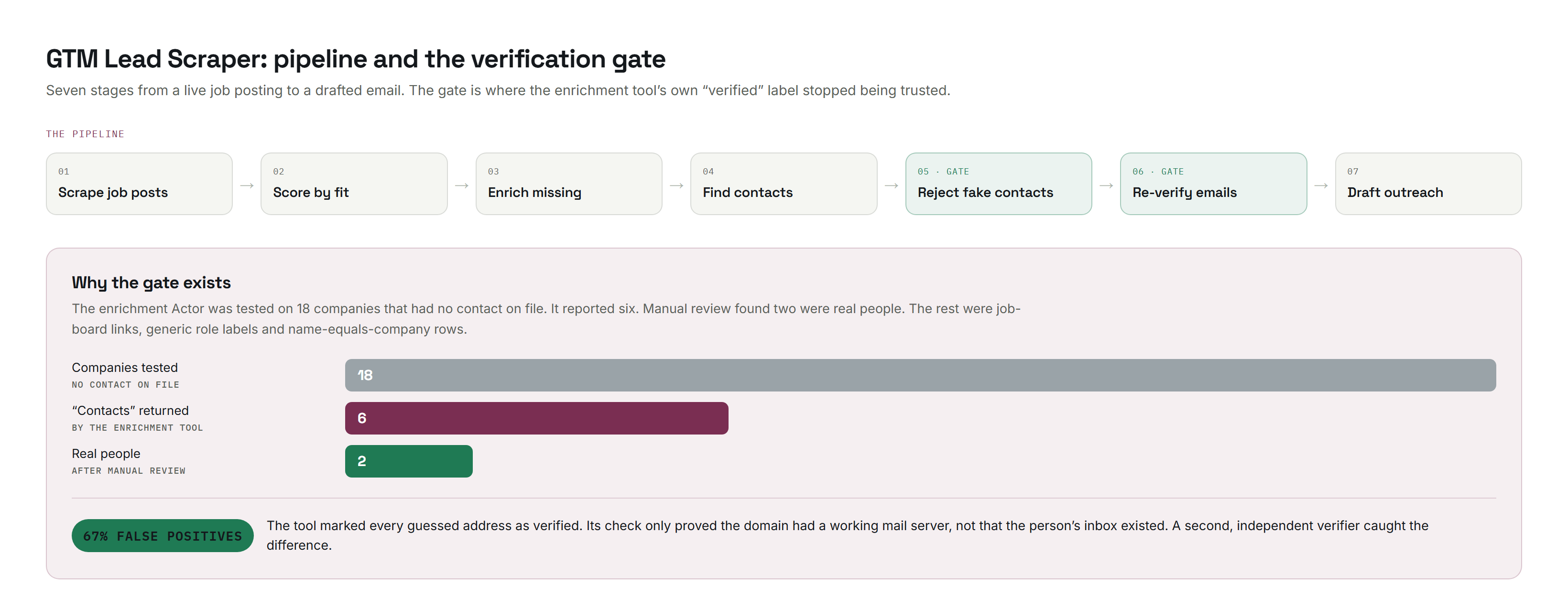
  • Tested the enrichment Actor on 18 of them: it returned 6 “contacts,” but manual review found only 2 were real people.
  • Found the tool had flagged every guessed email as verified, including obvious fakes. Its check only proved the domain had a working mail server, not that the person’s inbox existed.
  • Wrote a deterministic filter that rejects fake contacts: job-board links, generic role labels, name-equals-company.
  • Ran a second, independent email verifier, catching a 67% false-positive rate the enrichment tool’s own “verified” label had missed.
  • Packaged the result as a reusable Claude Code skill and a public GitHub repo, with known limitations documented rather than glossed over.

What it produced

Diagram: the seven-stage Lead Scraper pipeline, and why the verification gate exists
Pipeline diagram. The two gate stages are the ones that mattered: of six “contacts” the enrichment tool returned across 18 companies, manual review found two real people, and every guessed address had been marked verified.
Available for GTM systems work
Want this built on your data?

I can map the bottleneck, define the data flow, and build the automation from enrichment through activation.

← All case studies
CASE STUDY / 03 · MULTI-SIGNAL SCORING + AI ARK ENRICHMENT

GTM Signal Stack

Most outbound lists start with a company name and a guess. This one starts with a live signal: companies actively hiring for GTM Engineer or RevOps roles, sourced straight from Greenhouse, Lever and Ashby, not LinkedIn scraping.

50Companies scored, zero cost
5AI Ark-enriched, real firmographics
7Fully personalized, verified contacts

How I built it

  • Sourced companies hiring for GTM Engineer or RevOps roles straight from Greenhouse, Lever and Ashby job boards.
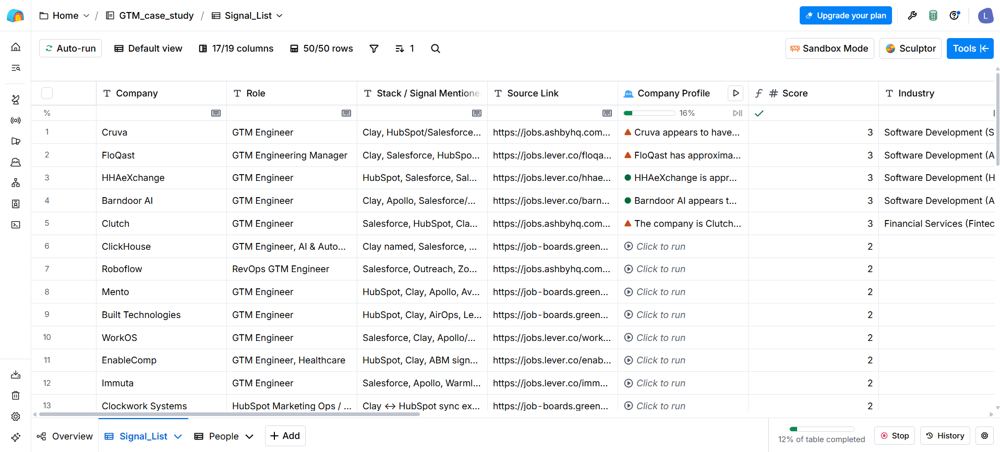
  • Scored every company for free with a formula that reads its own job description for stack mentions like Clay, Salesforce and HubSpot.
  • Spent no enrichment credit at all until after the scoring pass had ranked the list.
  • Moved only the top scorers into AI Ark for firmographics and growth signals.
  • Generated personalized first liners, subject lines and full email bodies from the real signal data, not a template.
  • Hit a constraint: AI Ark’s structured API needed Clay’s paid HTTP column. Rather than upgrade, searched AI Ark’s own UI for the shortlist, exported the results and merged them back into Clay by hand. This smaller manual step that kept the whole pipeline on free tools without losing the data.

What it produced

Signal_List table with free formula Score column and Industry, sorted highest to lowest
50 companies scored for free by a formula reading each job posting for stack mentions, before any paid enrichment runs
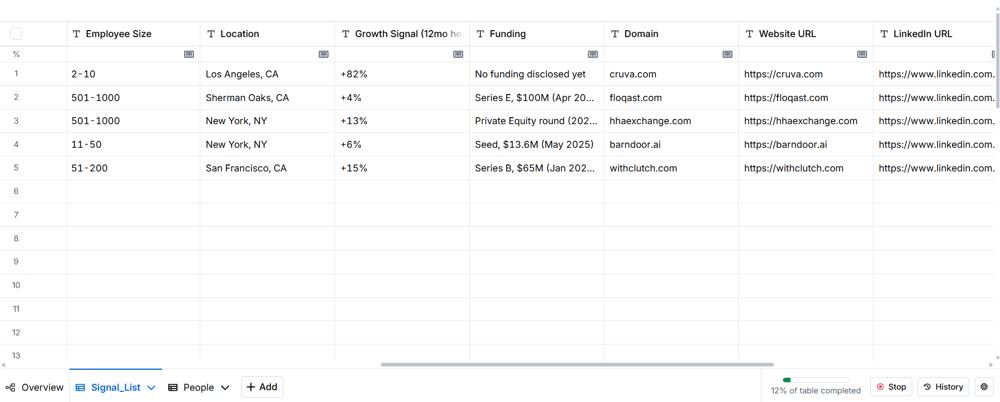
Signal_List table with AI Ark firmographics merged in: Employee Size, Location, Growth Signal, Funding
AI Ark’s firmographics and growth signals written straight into the same Clay table as the job-signal data
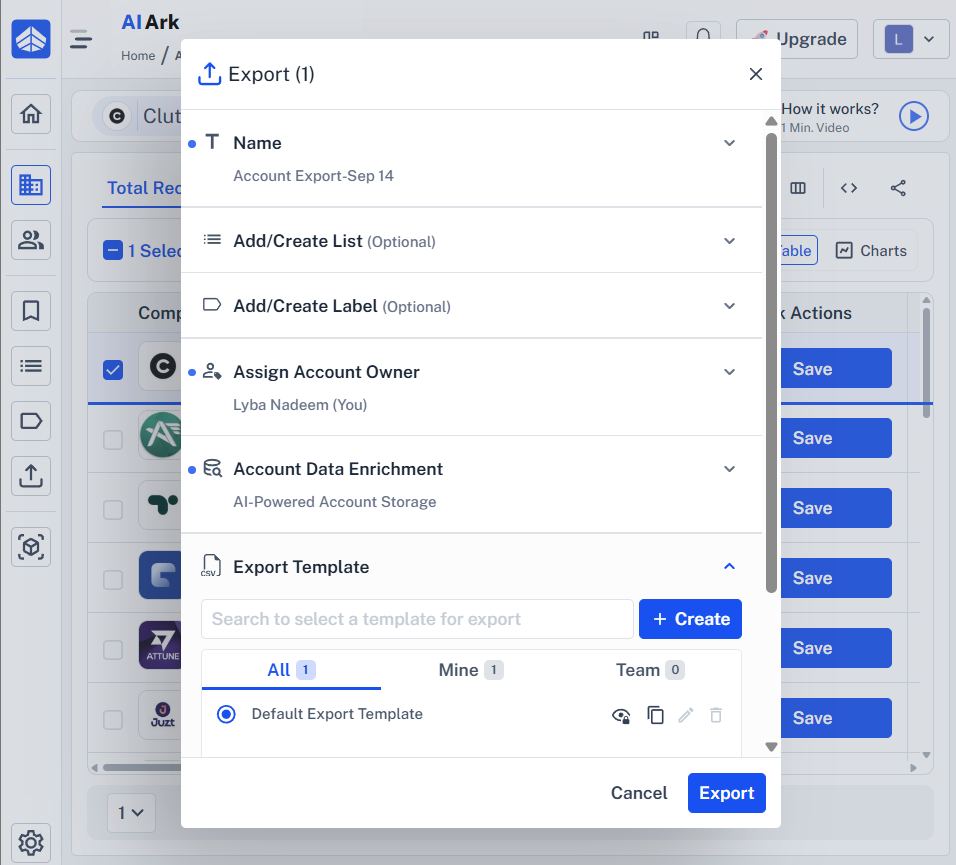
AI Ark Exports page showing the exported company records, downloadable as CSV
Every enriched company exported from AI Ark as a clean, traceable CSV record
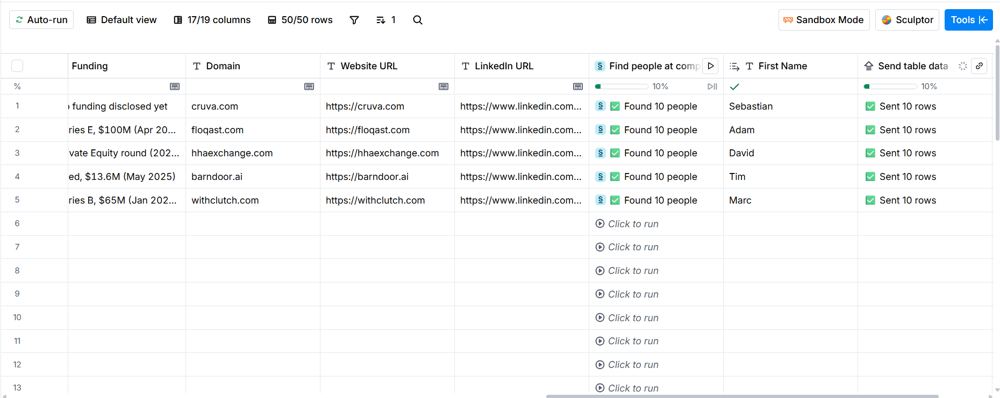
Clay table running Find people at company, resolving 10 contacts per shortlisted company
Contacts resolved per company, then carried into work email lookup and verification
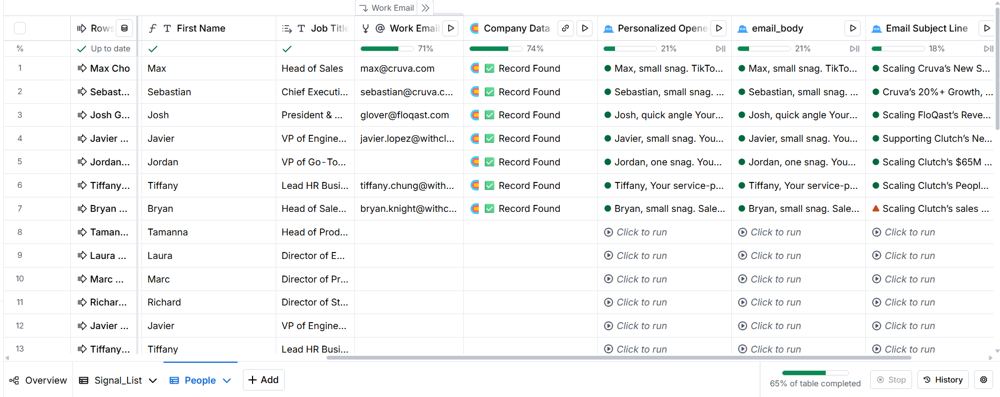
Clay People table with Work Email, Company Data, Personalized Opener, email_body, and Email Subject Line all filled
Verified work emails alongside AI-generated first liners, subject lines and full email bodies, each referencing the real signal pulled earlier
Available for GTM systems work
Want this built on your data?

I can map the bottleneck, define the data flow, and build the automation from enrichment through activation.

← All case studies
CASE STUDY / 04 · WATERFALL ENRICHMENT

Caffinity: 6-layer email waterfall

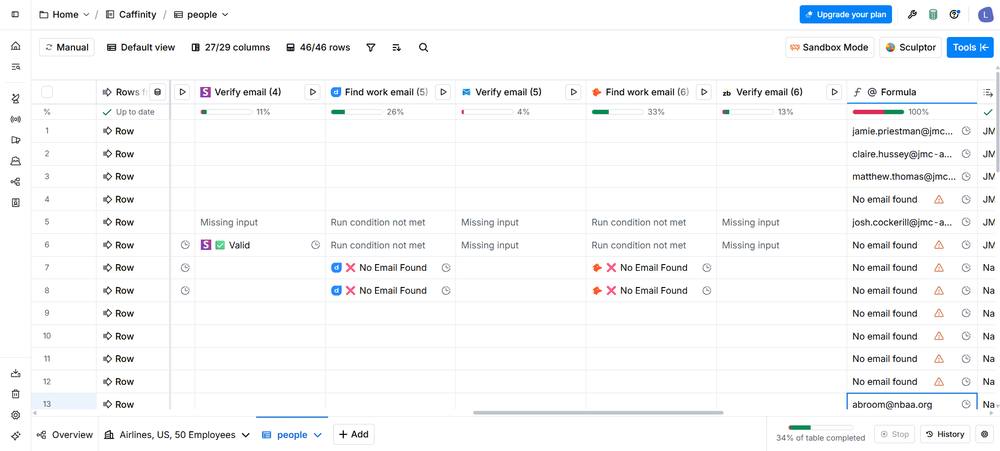
Instead of stopping at “no email found,” this table cascades every contact through six alternating find + verify layers, trying a new data provider each time the previous one misses, until a valid work email is confirmed or every option is exhausted.

46Contacts in table
6Find + verify layers
29Data columns

How I built it

  • Cascade every contact through six alternating find + verify layers.
  • Try a new data provider each time the previous one misses.
  • Advance only when the previous result is actually missing or invalid, never on a whim.
  • Verify before accepting any address, so a found email is not assumed to be a real one.
  • Stop when a valid work email is confirmed, or when every option has been exhausted and the state is recorded explicitly.
  • Compile one verified address with a final formula, ready for CRM and campaign handoff.

What it produced

Caffinity waterfall table, layers 1 to 3
Layers 1 to 3: Find work email → Verify email, repeated across three providers
Caffinity waterfall table, layers 4 to 6
Layers 4 to 6: continues the cascade, then compiles the final verified email via formula
Available for GTM systems work
Want this built on your data?

I can map the bottleneck, define the data flow, and build the automation from enrichment through activation.

← All case studies
CASE STUDY / 05 · AI PERSONALIZATION PIPELINE

Rivi: fully personalized email

The final stage of the pipeline: for every contact at Rivi, the table generates an AI company summary, segments the account, then writes a personalized first line, greeting and full email body, tailored per person, not templated.

72Contacts in table
100%Work emails found
3Personalized fields per lead

How I built it

  • Generated an AI company summary for every contact in the table.
  • Segmented each account (Rivi lands as SMB) so the message matches the company size.
  • Wrote a personalized first line, greeting and full email body per person, not from a template.
  • Mapped campaign-ready rows for CRM sync and controlled sequencer activation.

What it produced

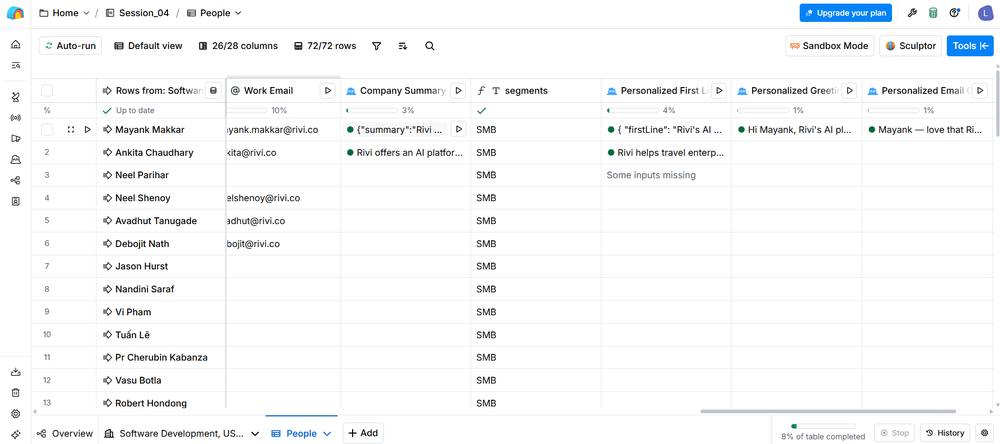
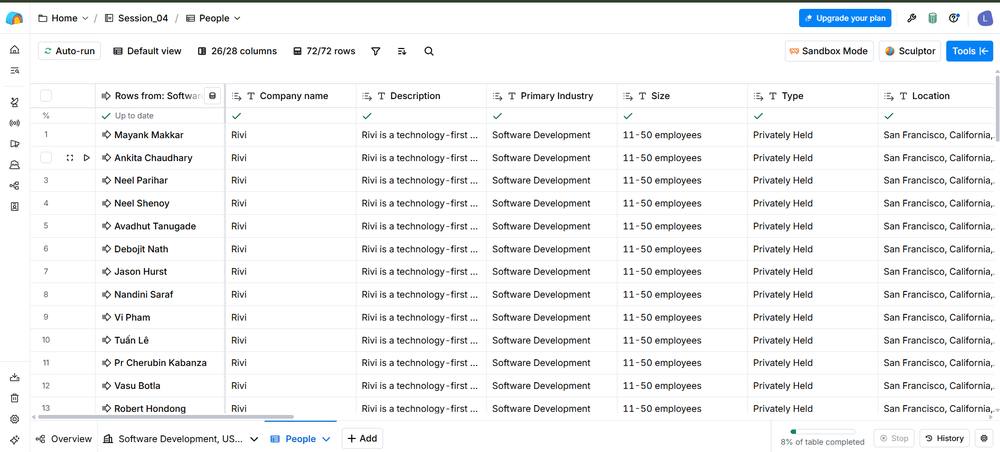
Rivi people table with company and contact fields
Contact list pulled from Rivi (Software Development, 11-50 employees)
Rivi table with personalized email fields ready to send
AI company summary → segment → personalized first line, greeting and full email body
Available for GTM systems work
Want this built on your data?

I can map the bottleneck, define the data flow, and build the automation from enrichment through activation.

← Back to home
BUILD NOTES / VIDEO

The thinking behind each workflow.

A quick intro, plus three short Loom walkthroughs covering enrichment setup, waterfall logic, and AI personalization in n8n.

INTRO
Meet Lyba: building outbound call systems end to end
Watch the intro
VIDEO 02
Waterfall logic, step by step
Provider fallbacks, verification gates, and the final-email formula.
VIDEO 03
AI personalization pipeline in n8n
Company summary, segmentation, and structured copy generation.
Need the implementation details?
Let's talk through the system behind the screens.

I'm open to GTM Engineering, RevOps Automation, and outbound-systems opportunities.